reaper@re4perz3d:~/writeups$ cat intro-to-volatility.md
Securinets Beginner CTF — Intro to Volatility
Challenge Description
“Analyze the provided Windows memory dump and answer the forensic questions to reveal the flag.”
This challenge introduces participants to Windows memory forensics using Volatility 3. By analyzing a memory dump (mem.dmp), players must extract system information, identify malicious activity, and recover a file hash to reconstruct the full flag.
Solution Walkthrough
💡 Tip: All commands are run using Volatility 3. The memory dump is named
mem.dmp.
For a quick reference of plugin mappings between Volatility 2 and 3, see: Volatility 3 CheatSheet
🔍 Step 1: Identify the Logged-in Username
Run:
vol -f mem.dmp windows.envars | grep -i username
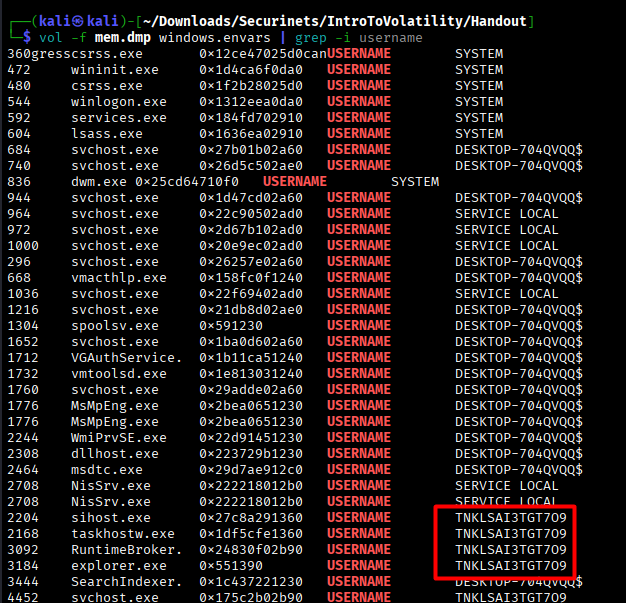
The windows.envars plugin lists environment variables for all processes. The interactive user (not SYSTEM or service accounts like DESKTOP-704QVQQ$) is the one running explorer.exe, firefox.exe, and the suspicious assistance.exe.
✅ Answer: TNKLSAI3TGT7O9
💻 Step 2: Find the Machine (Computer) Name
Run:
vol -f mem.dmp windows.envars | grep -i computername
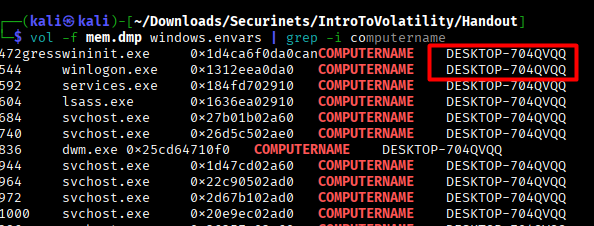
All processes consistently report the same machine name via the COMPUTERNAME environment variable.
✅ Answer: DESKTOP-704QVQQ
🌐 Step 3: Extract the Non-Local IPv4 Address
Run:
vol -f mem.dmp windows.netscan
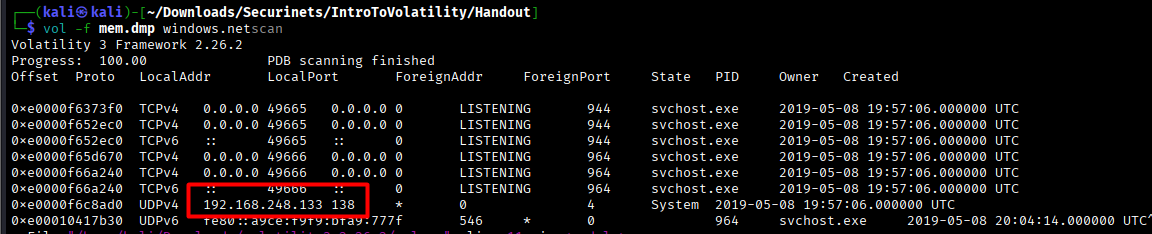
The windows.netscan plugin lists active network connections. Look for UDP/TCP entries with a concrete IPv4 (not 0.0.0.0 or 127.0.0.1).
✅ Answer: 192.168.248.133
🧨 Step 4: Identify the Malicious Executable Name
Run:
vol -f mem.dmp windows.pslist
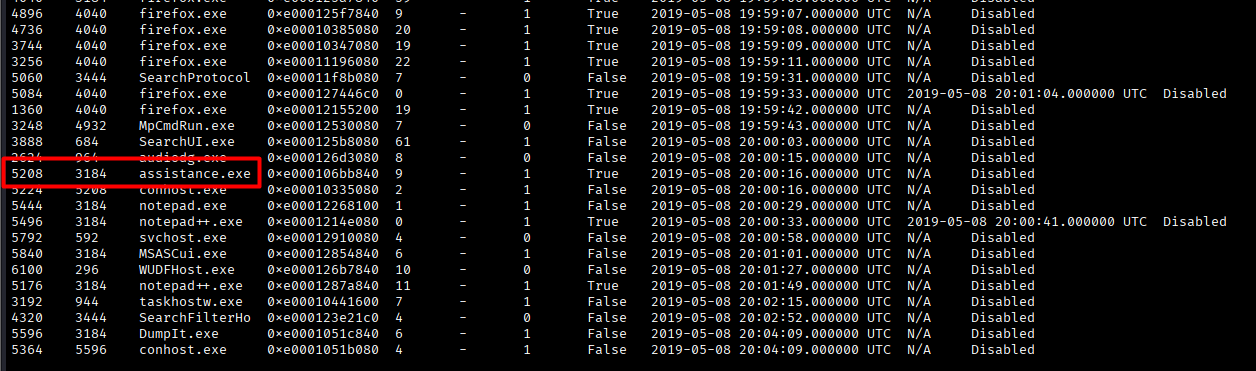
After analysis, we find several processes that appear to be legitimate (firefox.exe, notepad.exe, OneDrive.exe, etc.). However, one of them appears suspicious. It is assistance.exe with PID 5208. Indeed, this is not a process we usually observe.
✅ Answer: assistance.exe
🆔 Step 5: Get the PID of assistance.exe
From the same output above, the PID is: 5208
✅ Answer: 5208
🔐 Step 6: Extract and Hash the Malware Binary
Step 6.1: Locate the file in memory
Run:
vol -f mem.dmp windows.filescan | grep "assistance.exe"
Step 6.2: Dump the file
Run:
vol -f mem.dmp windows.filescan | grep "assistance.exe"
Step 6.3: Compute SHA256 hash
Run:
sha256sum file.0xe00011483b40.0xe000121e98b0.DataSectionObject.assistance.exe.dat
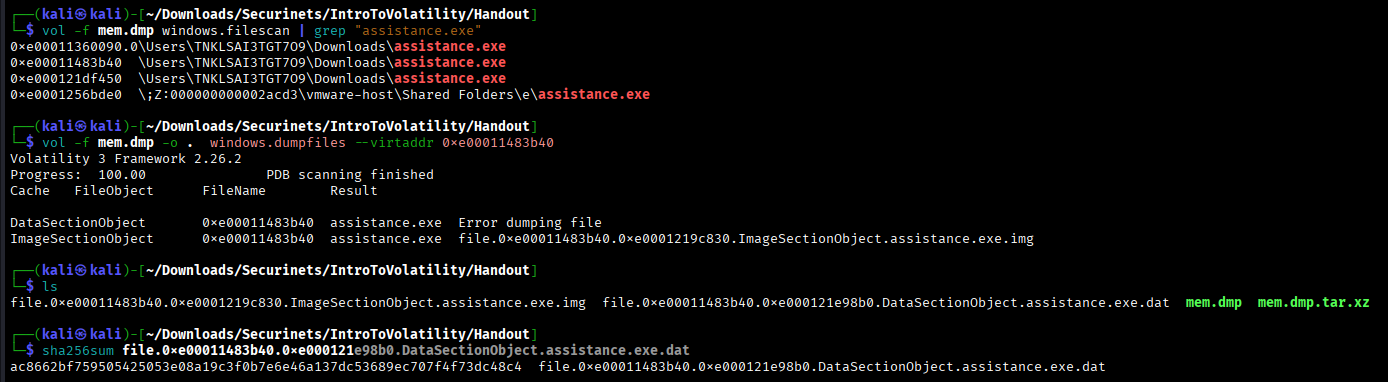
✅ Answer: ac8662bf759505425053e08a19c3f0b7e6e46a137dc53689ec707f4f73dc48c4
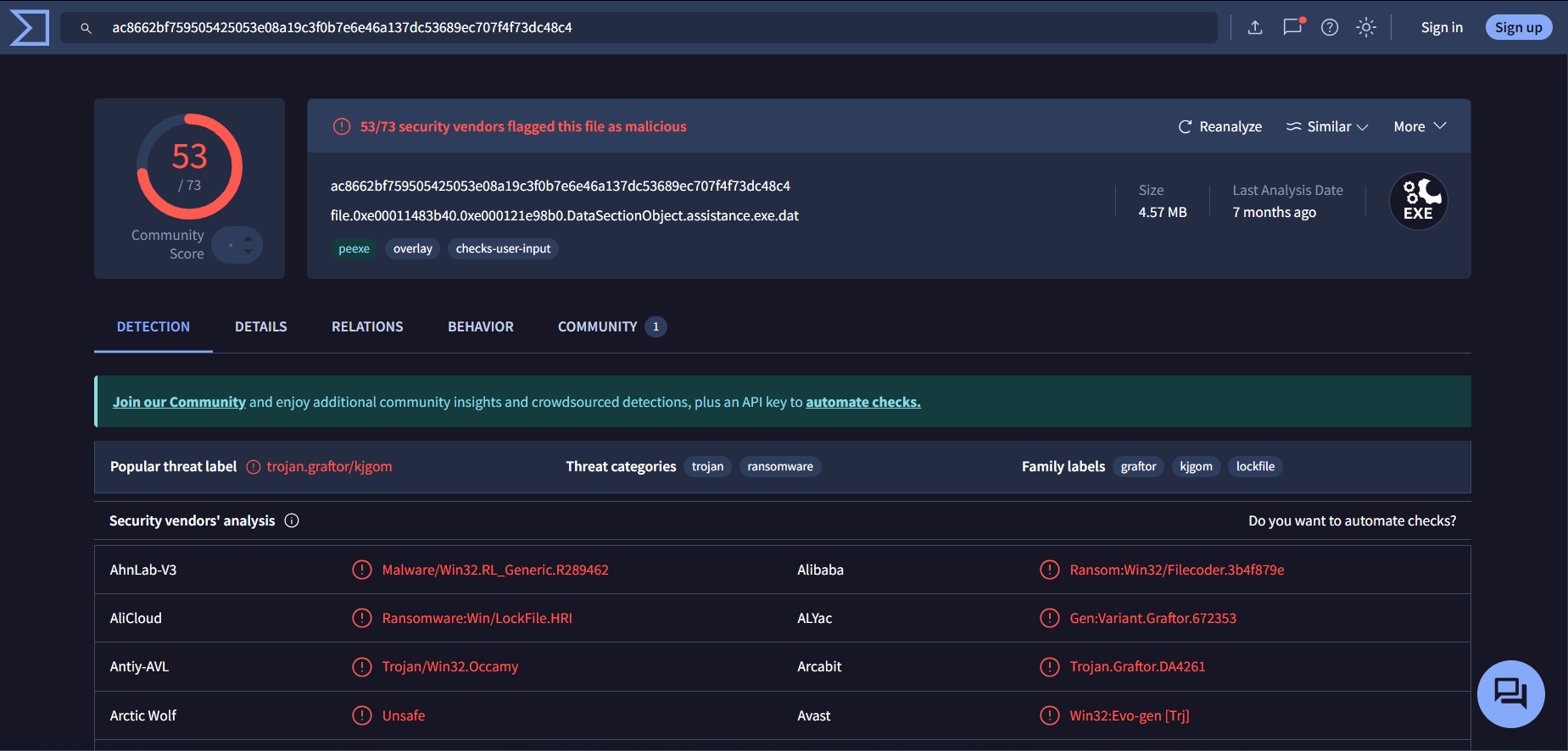
Verify Malware on VirusTotal (Optional but Convincing)
🏁 Final Flag After answering all six questions correctly:
✅ Flag: Securinets{W3lc0me_To_M3M0ry_An4lys1s}
💡 Key Takeaways
envarsreveals user and host context without registry access.netscanexposes real network IPs and connections.filescan+dumpfilesenables file extraction from memory—critical for malware analysis.- Hashes provide immutable evidence in forensic investigations.
🔒 This challenge mirrors real-world incident response workflows.